PersonaForge
Introduction
The PersonaForge Unity asset fully utilizes every feature of the Velesio AIServer and is the optimal way to utilize it. Currently the Generator has a minigame scene which features a RPG Character generator that allows playes to generate and talk to RPG characters in various scenarios.
All of the scenes from the asset pack were developed for and tested in Full HD (1920x1080 resolution), that is reccomended for testing.
The AI models stack is used to generate all of the content showcased in the asset’s marketing material. Also reccomended for the RPG Generator demo scene since the drop-down menu options are designated to utilize trigger words in the LoRA that is used. The asset’s font also requires TMP and TMP Extras to be installed, you can do so from Window > TextMeshPro in the Editor.
1
2
3
4
MODEL_URL=https://huggingface.co/Qwen/Qwen2.5-3B-Instruct-GGUF/resolve/main/qwen2.5-3b-instruct-q8_0.gguf
SD_MODEL_URL=https://civitai.com/api/download/models/128713?type=Model&format=SafeTensor&size=pruned&fp=fp16
LORA_URL=https://civitai.com/api/download/models/1569286?type=Model&format=SafeTensor
VAE_URL=https://huggingface.co/stabilityai/sd-vae-ft-mse-original/resolve/main/vae-ft-mse-840000-ema-pruned.safetensors
This model stack is focused around the RPG Character Maker Lora and the goal is to create portraits of characters in various contexts with which the player can chat with. All of the dropdown menu options are created to narrow down the options to specific lora keywords.
For more detailed documentation on the LLM for Unity and SD Integration, on which this asset is built on, you can consult their respective documentations.
Character Generator Scene
This is the primary scene of the Asset. The player fill out various characteristics of a character, or leaves them to be random, a prompt is then made to llamacpp and stablediffusion to generate a background and portrait of the character. The player can then chat with the character with a set context.
The primary configuration game object is the VelesioAI Integration game object, it contains the configurations for the llamacpp and stable diffusion connections as well as the scene itself.
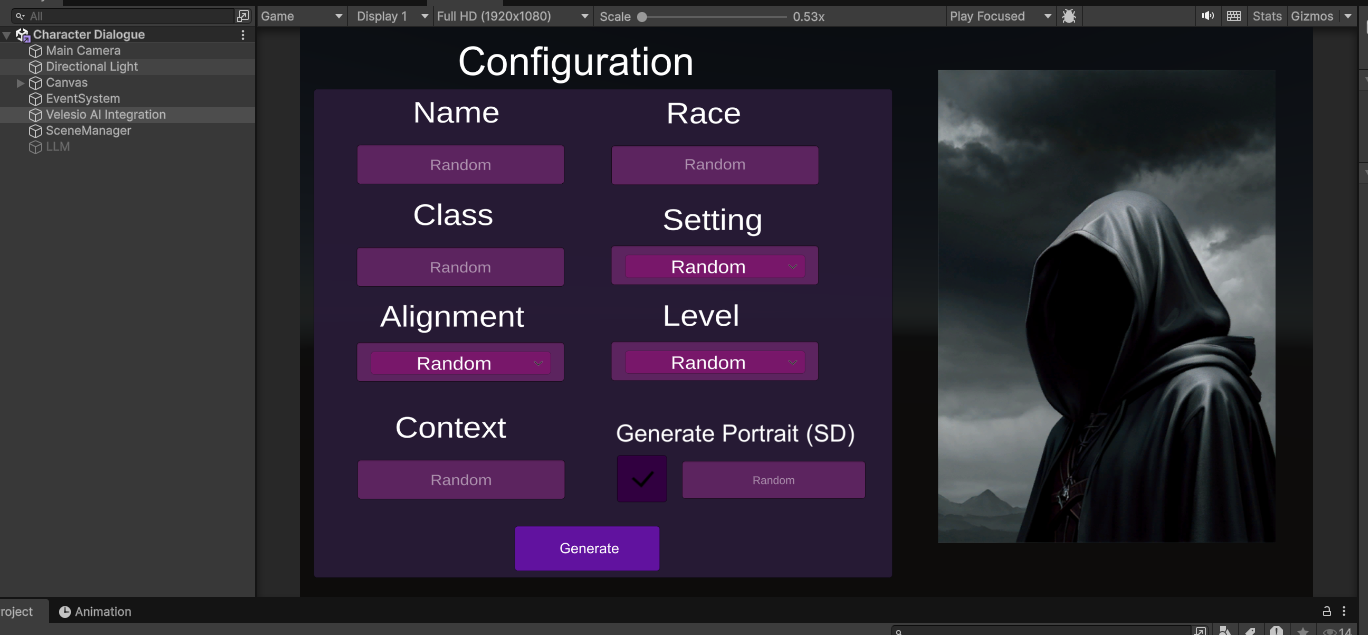 Main character generation interface
You can also utilize a local LLM through the disabled LLM object and unflicking API in the main configuration object.
Within the object, there is a LLMCharacter script, here you can configure the connection to your llamacpp server, most importantly the host and api key.
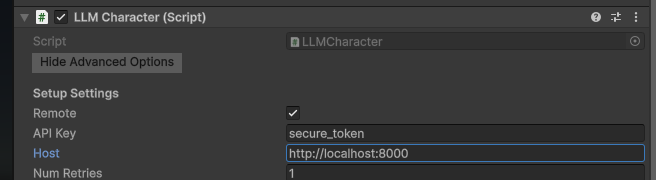
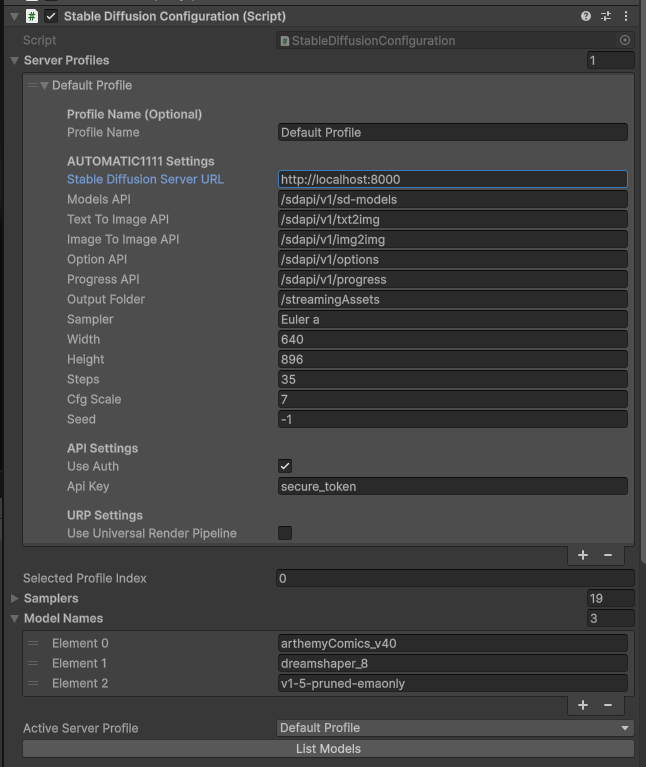
Bellow that you will see the SD configuration, here you set the hostname of the SD server (in the example we are pointing to the velesio api server so the url is the same as llamacpp but you might opt to host them completely seperately). Once your SD instance is set up, you have to press ‘List models’ to load the available models from the server, to be used by calls.
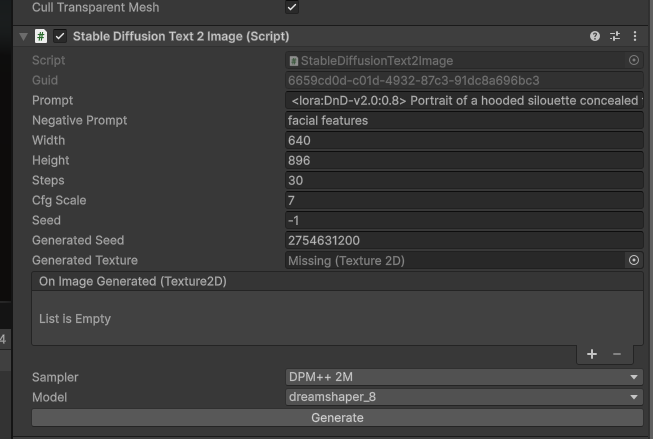
Within the scene, there is a character portrait, this is where you can find the SD to image script, which generates character portraits. Various configuration settings can be seen in this game object, most importantly the model that should be used. You can generate images in the editor itself but in the active scene this is filled out at runtime.
All of these components of the scene come together when you fill out the initial form, you essentially create a RPG character, their portrait is generated and then you can chat with them, all through AI.
All of the dropdown options in the scene are there to work optimally with the above reccomended model stack, they are trigger words that the portrait generation model expects to generate a specific character. You can visit the model’s Civitai page for further details.
Simple Connector Demos
In the Asset pack you will also find 3 simple demo scenes for llamacpp, ollama, openrouter and automatic1111 SD, each of them follows the same idea, just click on the VelesioAI Integration game object, configure the server you’re connecting to and follow the instructions in the scene.
Simple AI Chat
The Asset also features a simple chat feature, simply go to Window > Velesio > AI Chat Window
It can be used for convenient debugging on LLM connectivity as well as brainstorming ideas within Unity and your managed hardware!
Scripts Documentation
1
2
3
4
5
6
7
8
9
10
11
12
13
14
15
PersonaForge/
├── Demos/
│   ├── RPG Character Generator/    ← Main demo scene & scripts
│   ├── Simple LlamaCPP/            ← Basic LlamaCPP example
│   ├── Simple Ollama/              ← Basic Ollama example
│   ├── Simple OpenRouter/          ← Basic OpenRouter example
│   └── Simple SD/                  ← Basic Stable Diffusion example
├── Scripts/
│   ├── Runtime/
│   │   ├── Llamacpp/               ← LlamaCPP integration
│   │   ├── Ollama/                 ← Ollama API wrapper
│   │   ├── OpenRouter/             ← OpenRouter cloud LLM API
│   │   └── StableDiffusion/        ← Image generation
│   └── Editor/                     ← Custom inspectors & AI Chat Window
└── Settings/                       ← ScriptableObject configs
Architecture Overview
1
2
3
4
5
6
7
8
9
10
11
12
13
14
15
16
17
18
19
20
21
22
23
24
┌─────────────────────────┐
│  CharacterConfigurator  │  ← Collects UI inputs
└───────────┬─────────────┘
            │
            ▼
┌─────────────────────────┐
│        Prompt.cs        │  ← Builds prompts, calls LLM, triggers SD
└───────────┬─────────────┘
            │
    ┌───────┼───────┐
    ▼       ▼       ▼
┌──────┐ ┌──────┐ ┌───────────┐
│LlamaC│ │Ollama│ │OpenRouter │  ← Triple inference backends
└──────┘ └──────┘ └───────────┘
            │
            ▼
┌─────────────────────────┐
│   Stable Diffusion      │  ← Portrait generation
└───────────┬─────────────┘
            │
            ▼
┌─────────────────────────┐
│    RPGCharacter.cs      │  ← Interactive roleplay chat
└─────────────────────────┘
RPG Character Generator Scripts
CharacterConfigurator.cs
Purpose: The bridge between the character creation UI and the generation logic. Collects user parameters from the interface and passes them to the Prompt script.
Key Components:
- UI Elements:
TMP_InputField,TMP_Dropdown, andToggleelements for character name, race, class, universe, alignment, level, context, and portrait description. - Inference Dropdown: Selects between “Undream AI” (LlamaCPP) or “Ollama” backends.
- Dependencies: Requires references to
PromptandSceneManagerscripts.
Core Methods:
| Method | Description |
|——–|————-|
| TriggerGeneration() | Gathers UI inputs, handles randomization, and initiates character generation. |
| ShowConfiguration() | Resets UI fields and returns to the configuration view. |
| ShowLoadingIndicator() / HideLoadingIndicator() | Toggles the loading animation via SceneManager. |
Prompt.cs
Purpose: The central orchestrator for character generation. Constructs LLM prompts, handles triple inference backends (LlamaCPP/Ollama/OpenRouter), parses responses, and triggers portrait generation via Stable Diffusion.
Key Components:
- LLM Components:
LLMConfig(LlamaCPP),ollamaConfig,openRouterConfig, andsdImageGenerator(Stable Diffusion). - Prompt Templates:
characterPrompt,portraitStylePrefix, andnegativePrompt.
Core Methods:
| Method | Description |
|——–|————-|
| StartCharacterGeneration(...) | Main entry point. Builds prompts, calls LLM, parses results, triggers image generation. |
| GenerateWithOllama(string prompt) | Handles streaming generation via the Ollama backend. |
| GenerateWithOpenRouter(string prompt) | Handles streaming generation via the OpenRouter cloud backend. |
| BuildComprehensiveImagePrompt(...) | Creates a detailed Stable Diffusion prompt from the character description. |
| DisplayCharacterPortrait(Texture2D) | Callback that applies the generated portrait texture to the UI. |
| CancelRequest() | Stops ongoing requests and resets UI state. |
RPGCharacter.cs
Purpose: Manages the interactive roleplay chat after character generation. Maintains conversation context and supports LlamaCPP, Ollama, and OpenRouter backends.
Key Components:
LLMConfig: LlamaCPP component for chat responses.ollamaConfig: Ollama configuration for local inference.openRouterConfig: OpenRouter configuration for cloud inference.chatHistory: Stores the conversation log.
Core Methods:
| Method | Description |
|——–|————-|
| SetCharacterContext(...) | Initializes the chat with the character’s details and triggers an opening remark. |
| onInputFieldSubmit(string message) | Sends player messages to the LLM and displays the streamed response. |
| SetAIText(string text) | Updates the chat display during response streaming. |
| ChatWithOllama(string prompt) | Handles streaming chat via Ollama. |
| ChatWithOpenRouter(string prompt) | Handles streaming chat via OpenRouter. |
SceneManager.cs
Purpose: A simple UI state machine that manages panel visibility for different application states.
Key Components:
- UI Panels:
configurationPanel,backgroundPanel,chatPanel,loadingIndicator. SceneStateEnum:Configuration,Background,Chat.
Core Methods:
| Method | Description |
|——–|————-|
| SwitchToScene(SceneState newState) | Activates the appropriate panels for the given state. |
| ShowLoadingIndicator(bool show) | Toggles the loading indicator visibility. |
| UpdateCurrentSituation(string text) | Updates the “Current Situation” text on the background panel. |
| ResetToConfiguration() | Returns the UI to the initial configuration state. |
LlamaCPP Integration
Located in Scripts/Runtime/Llamacpp/
How It Works
LlamaCPP provides high-performance LLM inference. The integration connects to a remote llama.cpp server (local server management has been removed for simplicity).
Key Scripts
| Script | Purpose |
|---|---|
LLM.cs |
Server configuration component. Manages connection settings (port, context size, API key). |
LLMCaller.cs |
Base class for making LLM requests. Handles local/remote switching and request management. |
LLMChatTemplates.cs |
Chat template definitions for different model formats. |
LLMInterface.cs |
Request/response data structures for the llama.cpp API. |
Basic Usage
1
2
3
4
5
6
7
8
9
10
// LLMCaller handles the connection
public LLMCaller llmCharacter;

// Send a chat message and receive streaming response
string response = await llmCharacter.Chat(prompt, OnPartialResponse);

// Callback for streaming tokens
void OnPartialResponse(string partial) {
    responseText.text = partial;
}
Configuration
- Remote Mode: Set
remote = trueand configurehost(e.g.,localhost:13333). - Context Size: Adjust
contextSizeon theLLMcomponent (default: 8192). - Chat Template: Set the appropriate template for your model in
chatTemplate.
Ollama Integration
Located in Scripts/Runtime/Ollama/
How It Works
Ollama provides a simple REST API for running LLMs locally. The integration wraps the Ollama API with async/await patterns and streaming support.
Key Scripts
| Script | Purpose |
|---|---|
Chat.cs |
Chat completions with history management. Supports streaming responses. |
Generate.cs |
Raw text generation without chat context. |
Embeddings.cs |
Generate vector embeddings for RAG applications. |
RAG.cs |
Retrieval Augmented Generation helpers. |
ToolCalling.cs |
Function/tool calling support. |
Payload.cs |
Request/response data structures. |
Basic Usage
1
2
3
4
5
6
7
8
9
10
11
12
// Initialize a chat session
Ollama.InitChat(historyLimit: 8, system: "You are a helpful assistant.");

// Send a chat message (non-streaming)
string response = await Ollama.Chat("gemma3:4b", "Hello!");

// Send a chat message (streaming)
await Ollama.ChatStream(
    onTextReceived: (text) => responseText.text += text,
    model: "gemma3:4b",
    prompt: "Tell me a story"
);
Configuration
- Server URL: Configure via
OllamaSettingsScriptableObject or directly in scripts. - Model: Use Ollama model syntax (e.g.,
gemma3:4b,llama3:8b). - Keep Alive: Set how long the model stays loaded in memory (default: 300 seconds).
Chat History
1
2
3
4
5
// Save chat to disk
Ollama.SaveChatHistory("mychat.dat");

// Load chat from disk
Ollama.LoadChatHistory("mychat.dat", historyLimit: 8);
OpenRouter Integration
Located in Scripts/Runtime/OpenRouter/
How It Works
OpenRouter provides unified access to 100+ cloud LLM models from providers like OpenAI, Anthropic, Google, Meta, Mistral, and more through a single API. This is ideal when you don’t want to run models locally or need access to powerful cloud models like GPT-4, Claude, or Gemini.
Key Scripts
| Script | Purpose |
|---|---|
OpenRouter.cs |
Static API class. Handles chat, streaming, model listing, and history management. |
OpenRouterConfig.cs |
MonoBehaviour configuration component. Manages API key, model, temperature, and other settings. |
OpenRouterPayload.cs |
Request/response data structures for the OpenRouter API. |
Basic Usage
1
2
3
4
5
6
7
8
9
10
11
12
13
14
15
16
17
18
19
20
// Configure OpenRouter (typically done by OpenRouterConfig.Awake())
OpenRouter.SetApiKey("sk-or-v1-your-api-key");

// Initialize a chat session
OpenRouter.InitChat(historyLimit: 8, system: "You are a helpful assistant.");

// Send a chat message (non-streaming)
string response = await OpenRouter.Chat("openai/gpt-4o-mini", "Hello!");

// Send a chat message (streaming)
await OpenRouter.ChatStream(
    onTextReceived: (text) => responseText.text += text,
    model: "anthropic/claude-3.5-sonnet",
    prompt: "Tell me a story",
    temperature: 0.7f,
    maxTokens: 1024
);

// List available models
var models = await OpenRouter.GetModels();
Configuration
Use the OpenRouterConfig component in your scene:
- API Key: Get from openrouter.ai/keys. Required for all requests.
- Model: Model ID in provider/model format (e.g.,
openai/gpt-4o,anthropic/claude-3.5-sonnet,google/gemini-pro). - Temperature: Sampling temperature (0.0 = deterministic, 2.0 = very random).
- Max Tokens: Maximum tokens to generate (0 = model default).
- History Limit: Number of messages to keep in chat history.
- Site URL/Name: Optional metadata for OpenRouter rankings and analytics.
Popular Models
| Model ID | Provider | Description |
|---|---|---|
openai/gpt-4o |
OpenAI | Latest GPT-4 Omni model |
openai/gpt-4o-mini |
OpenAI | Fast, affordable GPT-4 |
anthropic/claude-3.5-sonnet |
Anthropic | Claude 3.5 Sonnet |
google/gemini-pro |
Gemini Pro | |
meta-llama/llama-3.1-70b-instruct |
Meta | Llama 3.1 70B |
mistralai/mistral-large |
Mistral | Mistral Large |
Chat History
1
2
3
4
5
// Save chat to disk
OpenRouter.SaveChatHistory("mychat.dat");

// Load chat from disk
OpenRouter.LoadChatHistory("mychat.dat", historyLimit: 8);
Editor Chat Window
The AI Chat Window (Window → Velesio → AI Chat Window) supports OpenRouter as a third tab alongside LlamaCPP and Ollama. Configure your API key and model directly in the settings panel.
Stable Diffusion Integration
Located in Scripts/Runtime/StableDiffusion/
How It Works
Connects to an Automatic1111 Stable Diffusion WebUI server to generate images from text prompts.
Key Scripts
| Script | Purpose |
|---|---|
StableDiffusionGenerator.cs |
Base class with progress tracking and server communication. |
StableDiffusionText2Image.cs |
Generate images from text prompts. |
StableDiffusionImage2Image.cs |
Transform existing images with prompts. |
StableDiffusionText2Material.cs |
Generate PBR materials from text. |
StableDiffusionConfiguration.cs |
Server profiles and global settings. |
SDSettings.cs |
Per-profile generation defaults. |
Basic Usage
1
2
3
4
5
6
7
8
9
10
11
12
13
14
15
16
17
18
public StableDiffusionText2Image sdGenerator;

// Configure the prompt
sdGenerator.prompt = "fantasy warrior portrait, detailed, dramatic lighting";
sdGenerator.negativePrompt = "blurry, low quality";
sdGenerator.width = 512;
sdGenerator.height = 512;
sdGenerator.steps = 30;

// Subscribe to completion event
sdGenerator.OnImageGenerated.AddListener(OnPortraitGenerated);

// Generate
sdGenerator.Generate();

void OnPortraitGenerated(Texture2D texture) {
    portraitImage.texture = texture;
}
Configuration
- Server URL: Configure in
StableDiffusionConfigurationcomponent. - Sampler: Select from available samplers (e.g.,
Euler a,DPM++ 2M). - Model: Select from models available on your SD server.
- Parameters:
steps: Number of diffusion steps (higher = better quality, slower).cfgScale: How closely to follow the prompt (7-12 typical).seed: Use-1for random, or set a specific seed for reproducibility.width/height: Image dimensions (128-2048, must be multiples of 8).
Server Profiles
Use StableDiffusionConfiguration to manage multiple server profiles:
- Local development server
- Remote production server
- Different model configurations
Quick Reference: Triple Inference Support
The asset supports three LLM backends:
| Backend | Use Case | Configuration |
|---|---|---|
| LlamaCPP | Remote llama.cpp server | Set host and port on LLM component |
| Ollama | Local Ollama server | Set URL and model in OllamaConfig component |
| OpenRouter | Cloud LLM providers (OpenAI, Anthropic, Google, etc.) | Set API key and model in OpenRouterConfig component |
Select your preferred backend via the Inference Method dropdown in the character configuration UI.