Runpod Quickstart
Prerequisites
In runpod only the GPU component can be hosted, you can either host it standalone with API set to false, or connect it to an external API service. Hosting the API service in runpod is not possible for now since they don’t support firewall configurations.
Before you begin, ensure you have:
-
A Runpod account if you don’t have one yet, you can use my refferal link to get a 5$ starting bonus! Its also a great way to support this project!
-
If you are running in API=true mode, you need to host the API server externally from Rupod, on AWS Lightsail for example. Make sure to open the redis port just to the Runpod worker’s IP for optimal security. For a testing setup, its best to just start off with API=false.
Image
Runpod tag recommendation
- For Runpod, the template uses the
:amd7702image tag that is published from this repository for the Runpod RTX 4000 Ada (AMD 7702) pod — this is the tag we tested on that hardware. The:amd7702tag contains prebuilt artifacts suited for that environment and should reduce startup friction. - The
:amd7702image is recommended for the RTX 4000 Ada pod, but the:latesttag remains available. The:latestimage will (re)compile the llama.cpp binary where it runs, so if you encounter binary/compatibility issues with the prebuilt tag, try:latestwhich will build locally on the pod instead.
Steps
1. Open the Runpod template link
Choose a GPU you want to use. The minimal reccomended GPU for the RPG Generator template is the RTX 4000 Ada. You can also use a persistent volume to prevent downloading models on every pod reset.
2. Environment Variables Configuration
In the runpod template you can overwrite any environment variables. The default setup uses the reccomended RPG Generator models and hosts the ai inference components standalone (API=false). If you are already hosting an api server outside of Runpod, in distributed mode, you need to set API=true and the REDIS_URL and REDIS_PASS.
1
2
3
4
5
6
7
8
9
10
11
12
13
14
15
16
# Startup commands
STARTUP_COMMAND=./llama-server --model /app/data/models/text/model.gguf --host 0.0.0.0 --port 1337 --gpu-layers 37 --template chatml
SD_STARTUP_COMMAND=./venv/bin/python launch.py --listen --port 7860 --api --nowebui --skip-torch-cuda-test --no-half-vae --medvram --xformers --skip-version-check

#Configuration
API=false # false does not connect llamacpp server to api
RUN_SD=true
REDIS_HOST=redis
REDIS_PASS=secure_redis_pass

# Model urls
MODEL_URL=https://huggingface.co/Qwen/Qwen2.5-3B-Instruct-GGUF/resolve/main/qwen2.5-3b-instruct-q8_0.gguf
SD_MODEL_URL=https://civitai.com/api/download/models/128713?type=Model&format=SafeTensor&size=pruned&fp=fp16
LORA_URL=https://civitai.com/api/download/models/110115?type=Model&format=SafeTensor
VAE_URL=https://huggingface.co/stabilityai/sd-vae-ft-mse-original/resolve/main/vae-ft-mse-840000-ema-pruned.safetensors
SD_STARTUP_COMMAND=./venv/bin/python launch.py --listen --port 7860 --api --skip-torch-cuda-test --no-half-vae --medvram --xformers --skip-version-check
3. Wait for server to start up
The models and pip requirements will be installed the first time and saved on the disk for persistent runs.
The AI inference server is up and running when you see this in the logs;
1
velesio-gpu  | INFO [            start_server] HTTP server listening | tid="135629304680448" timestamp=1760540334 n_threads_http="11" port="1337" hostname="0.0.0.0"
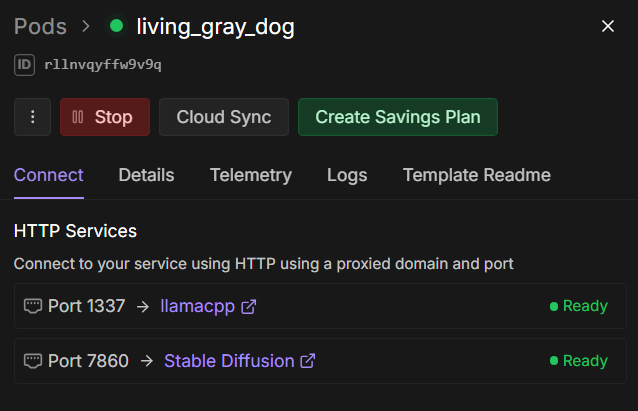
You should also see both the llamacpp and Stable Diffusion services online, you can click on them here to get each service’s URL.
4. Run!
5. Connect in Unity!
Refer to one of the Unity integrations sections to start using your AI Inference server in Unity.
Test
Test your installation with a simple API call:
1
2
3
4
5
6
7
8
curl -X POST http://LLAMACPP_URL/completion \
  -H "Authorization: Bearer secure_token" \
  -H "Content-Type: application/json" \
  -d '{
    "prompt": "Explain quantum computing in simple terms:",
    "max_tokens": 100,
    "temperature": 0.7
  }'
Expected response:
1
2
3
4
5
6
7
8
9
10
11
12
13
{
  "choices": [
    {
      "text": "Quantum computing is a revolutionary approach to computation...",
      "finish_reason": "length"
    }
  ],
  "usage": {
    "prompt_tokens": 8,
    "completion_tokens": 100,
    "total_tokens": 108
  }
}