Velesio AIntegration
Introduction
The Velesio AIntegration Unity asset fully utilizes every feature of the Velesio AIServer and is the optimal way to utilize it. Currently the Generator has one scene which features a RPG Character generator that allows playes to generate and talk to DND characters in various scenarios. It is a combination of two open source projects, Undream LLM for unity and dobrado76’s Stable Diffusion Integration for unity to create a comprehensive tool for AI generated content, both for development and runtime.
All of the scenes from the asset pack were developed for and tested in Full HD (1920x1080 resolution), that is reccomended for testing.
The AI models stack is used to generate all of the content showcased in the asset’s marketing material. Also reccomended for the RPG Generator demo scene since the drop-down menu options are designated to utilize trigger words in the LoRA that is used. The asset’s font also requires TMP and TMP Extras to be installed, you can do so from Window > TextMeshPro in the Editor.
1
2
3
4
MODEL_URL=https://huggingface.co/Qwen/Qwen2.5-3B-Instruct-GGUF/resolve/main/qwen2.5-3b-instruct-q8_0.gguf
SD_MODEL_URL=https://civitai.com/api/download/models/128713?type=Model&format=SafeTensor&size=pruned&fp=fp16
LORA_URL=https://civitai.com/api/download/models/1569286?type=Model&format=SafeTensor
VAE_URL=https://huggingface.co/stabilityai/sd-vae-ft-mse-original/resolve/main/vae-ft-mse-840000-ema-pruned.safetensors
This model stack is focused around the DND Character Maker Lora and the goal is to create portraits of characters in various contexts with which the player can chat with. All of the dropdown menu options are created to narrow down the options to specific lora keywords.
For more detailed documentation on the LLM for Unity and SD Integration, on which this asset is built on, you can consult their respective documentations.
Character Generator Scene
This is the primary scene of the Asset. The player fill out various characteristics of a character, or leaves them to be random, a prompt is then made to llamacpp and stablediffusion to generate a background and portrait of the character. The player can then chat with the character with a set context.
The primary configuration game object is the VelesioAI Integration game object, it contains the configurations for the llamacpp and stable diffusion connections as well as the scene itself.
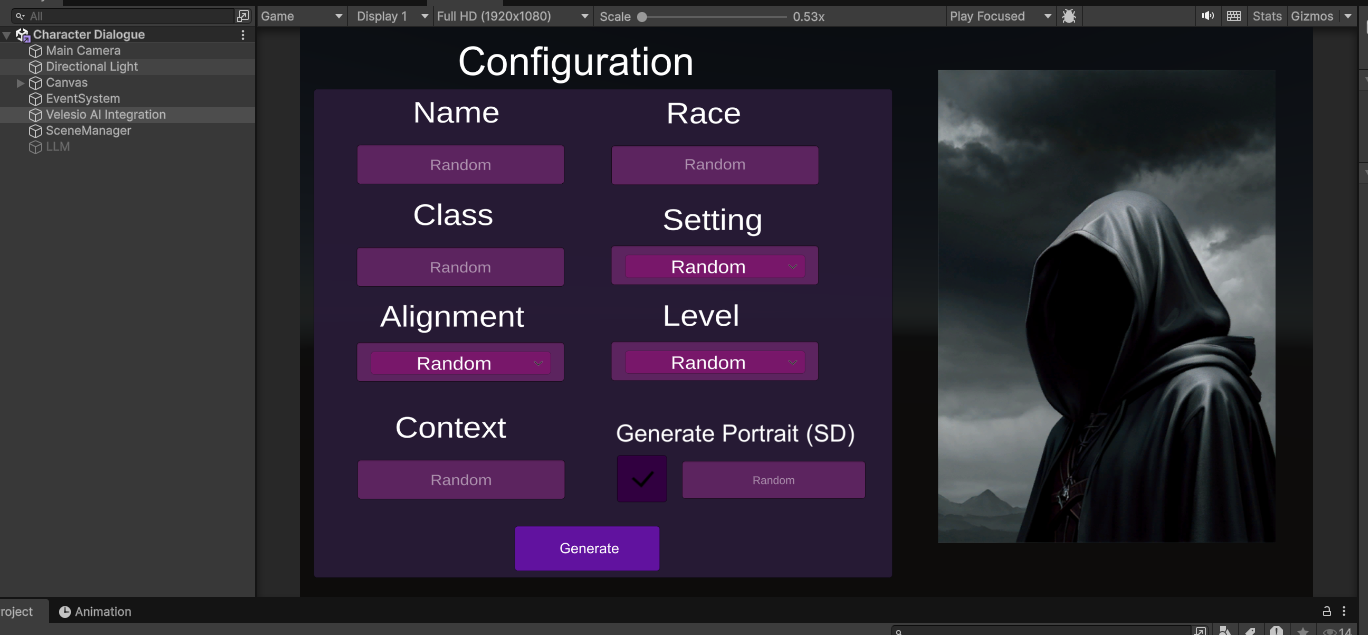 Main character generation interface
You can also utilize a local LLM through the disabled LLM object and unflicking API in the main configuration object.
Within the object, there is a LLMCharacter script, here you can configure the connection to your llamacpp server, most importantly the host and api key.
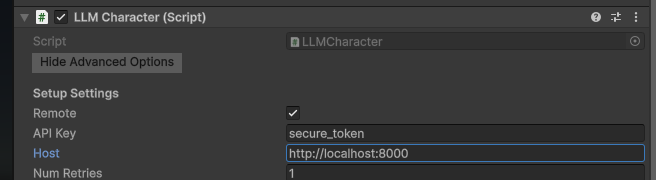
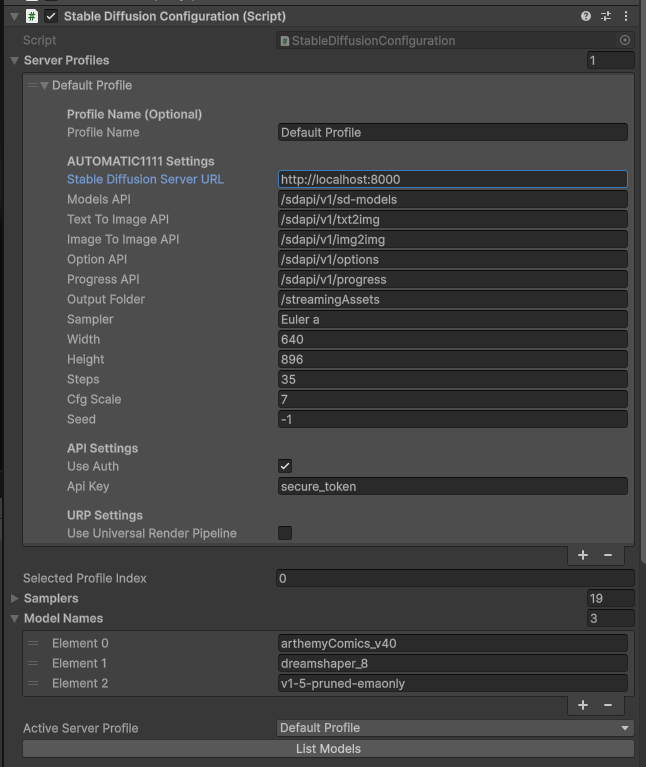
Bellow that you will see the SD configuration, here you set the hostname of the SD server (in the example we are pointing to the velesio api server so the url is the same as llamacpp but you might opt to host them completely seperately). Once your SD instance is set up, you have to press ‘List models’ to load the available models from the server, to be used by calls.
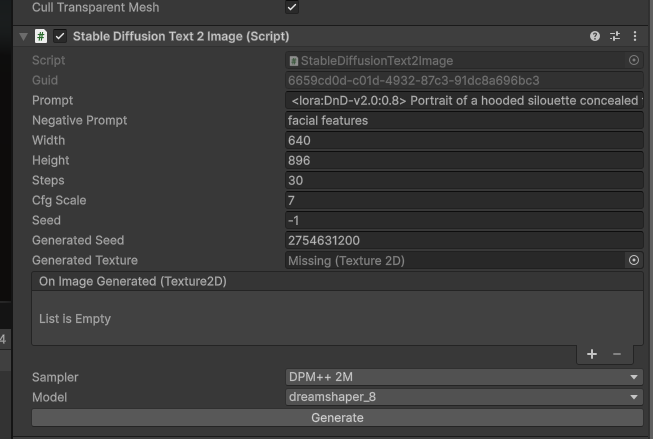
Within the scene, there is a character portrait, this is where you can find the SD to image script, which generates character portraits. Various configuration settings can be seen in this game object, most importantly the model that should be used. You can generate images in the editor itself but in the active scene this is filled out at runtime.
All of these components of the scene come together when you fill out the initial form, you essentially create a DND character, their portrait is generated and then you can chat with them, all through AI.
All of the dropdown options in the scene are there to work optimally with the above reccomended model stack, they are trigger words that the portrait generation model expects to generate a specific character. You can visit the model’s Civitai page for further details.
Simple Connector Demos
In the Asset pack you will also find 3 simple demo scenes for llamacpp, ollama and automatic1111 SD, each of them follows the same idea, just click on the VelesioAI Integration game object, configure the server you’re connecting to and follow the instructions in the scene.
Scripts documentation
CharacterConfigurator.cs
Purpose:
This script acts as the bridge between the user interface for character creation and the backend generation logic. It collects all user-defined parameters from input fields and dropdowns and passes them to the PromptButton script to initiate the character generation process.
Key Components:
- UI Elements: A collection of
TMP_InputField,TMP_Dropdown, andToggleelements that capture user preferences for the character’s name, race, class, universe, alignment, level, context, and portrait description. startGenerationButton: TheButtonthat triggers the character generation.- Dependencies:
promptButtonScript: A required reference to thePromptButtonscript, which it calls to start the generation.sceneManager: A required reference to theSceneManagerto control UI panel transitions.
Core Methods:
TriggerGeneration(): Gathers all data from the UI inputs, determines if any values need to be randomized, and callspromptButtonScript.StartCharacterGeneration()with the final parameters. It also instructs theSceneManagerto switch to the background/results view.ShowConfiguration(): Resets all UI fields to their default state and tells theSceneManagerto return to the configuration view.ShowLoadingIndicator()/HideLoadingIndicator(): These methods are called byPromptButtonto toggle the loading animation via theSceneManager.
PromptButton.cs
Purpose:
This is the central script for the character generation logic. It constructs a detailed prompt for the LLM based on the template and user-provided constraints. After receiving the character description from the LLM, it parses the response and, if enabled, constructs a new prompt to generate a character portrait using the Stable Diffusion script.
Key Components:
- LLM Components:
llmCharacter: TheLLMCharactercomponent used to generate the character’s text description.sdImageGenerator: TheStableDiffusionText2Imagecomponent used for generating the portrait.
- UI Elements:
responseText: ATextelement to display the generated character sheet.characterPortraitImage: ARawImageto display the generated character portrait.
characterPrompt: ATextAreastring that serves as the base template for the LLM.portraitStylePrefix/negativePrompt: Strings used to refine the prompt sent to the image generator for better results.- Dependencies:
chatInterface(DemoScript): Used to pass the final character context to the chat system.characterConfigurator: Used to show/hide the loading indicator.sceneManager: Used to update the “Current Situation” text on the background panel.
Core Methods:
StartCharacterGeneration(...): The main entry point. It builds the final text prompt, awaits the response from thellmCharacter, parses the result, and then triggers thesdImageGenerator.BuildComprehensiveImagePrompt(...): Creates a detailed prompt for the image generator by combining theportraitStylePrefixwith key details extracted from the generated character description.DisplayCharacterPortrait(Texture2D portraitTexture): A callback method that is executed when thesdImageGeneratorfinishes. It applies the receivedTexture2Dto thecharacterPortraitImage.CancelRequest(): Stops any ongoing LLM or Stable Diffusion requests and resets the UI.
DNDCharacter.cs (Component: DemoScript)
Purpose:
This script manages the interactive chat functionality. Once a character is generated, this script takes over to facilitate a role-playing conversation. It uses the generated character’s information, universe, and situation to maintain context in its conversation with the player.
Key Components:
llmCharacter: TheLLMCharactercomponent used to generate in-character chat responses.- UI Elements:
playerText: AnInputFieldfor the user to type messages.AIText: ATextMeshProUGUIelement to display the conversation log.
systemPrompt: A string that instructs the LLM to respond in character based on the provided context.chatHistory: AList<string>that stores the conversation, which is used to update the chat display.
Core Methods:
SetCharacterContext(string characterInfo, string universe, string context): Called byPromptButtonafter generation is complete. It initializes the chat by providing the script with the character’s details, universe, and current situation. It also triggers an initial in-character remark from the LLM.onInputFieldSubmit(string message): Triggered when the player sends a message. It constructs a new prompt including the system prompt, character context, and the player’s message, then sends it to thellmCharacter.SetAIText(string text): A callback for thellmCharacter.Chatcall that updates the AI’s response in the chat window as it’s being streamed.
SceneManager.cs
Purpose:
This script acts as a simple state machine for the UI. It manages which panels (Configuration, Background, Chat) are active, ensuring that the user only sees the relevant interface for the current state of the application.
Key Components:
- UI Panels:
GameObjectreferences to the different panels that make up the UI (configurationPanel,backgroundPanel,chatPanel,loadingIndicator). - Navigation Buttons:
Buttonreferences for navigating between the “Background” and “Chat” views. SceneStateEnum: An enum (Configuration,Background,Chat) to define the possible UI states.
Core Methods:
SwitchToScene(SceneState newState): The primary method for changing the application’s state. It deactivates all panels and then activates only the ones required for thenewState.ShowLoadingIndicator(bool show): Toggles the visibility of theloadingIndicatorGameObject.UpdateCurrentSituation(string situationText): Updates aTextelement on the background panel to display the character’s current context.ResetToConfiguration(): A public method to easily return the application to its initial configuration state.
SimpleScene.cs (Component: SimpleLLMPrompt)
Purpose:
This script provides a minimal, self-contained example of how to use the LLMCharacter component. It is not used in the main D&D character generator scene but is included as a basic demonstration of sending a prompt to an LLM and receiving a streaming response.
Key Components:
llmCharacter: TheLLMCharactercomponent to interact with.- UI Elements:
promptInput: ATMP_InputFieldfor user input.responseText: ATextMeshProUGUIto display the LLM’s response.
systemPrompt: A basic instruction for the AI assistant.
Core Methods:
OnSubmitPrompt(): Called when the user submits text. It sends the input to thellmCharacter.Chatmethod.OnResponseUpdate(string partialResponse): A callback that updates theresponseTextwith the streaming output from the LLM.OnResponseComplete(): A callback executed when the full response has been received.